
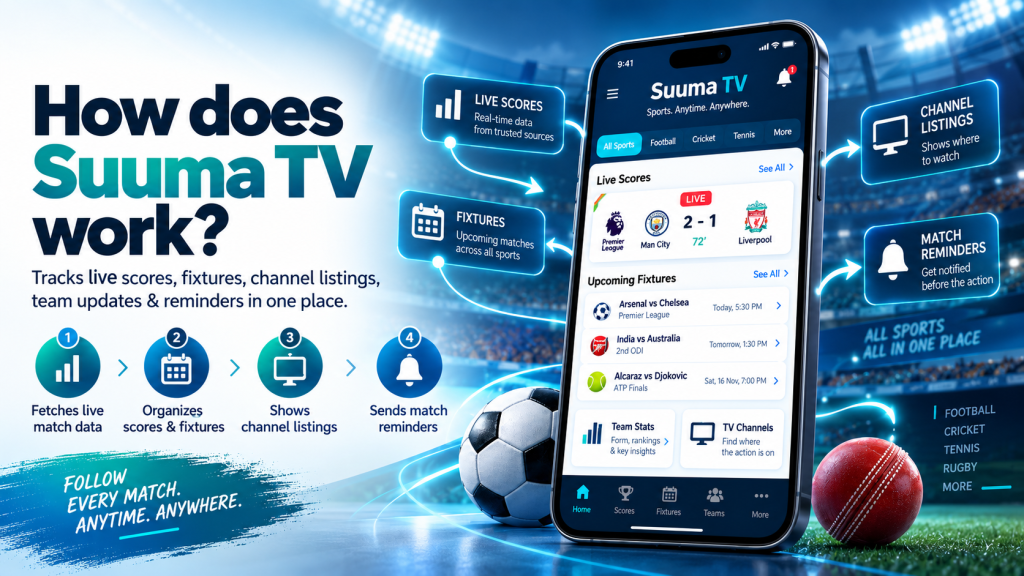
Suuma TV works as an Android sports information app that brings live scores, fixtures, channel listings, team details, and match updates into one place. Instead of opening several websites to check what is live, when a game starts, or where it is being shown, users can find useful information through a single interface.
The app focuses on quick access rather than heavy video streaming. It collects published sports data, organizes it for the user, and refreshes relevant information while matches are in progress. This makes Suuma TV useful for fans who want fast updates without unnecessary complexity.
Understanding the Core System Behind Suuma TV
At its core, Suuma TV acts as a reader and organizer of sports information. It does not work like a traditional broadcaster that hosts and delivers live video. Instead, the app requests current match information over an internet connection and presents it in an easy-to-read format.
Users can see what is happening now, check future games, and find the channel associated with a fixture. Because the app concentrates on sports data rather than heavy video files, the experience can remain lightweight and simple on everyday Android devices.
Your Preferences Shape the Home Screen
The experience begins with the sports, competitions, or teams a user chooses to follow. These preferences help Suuma TV decide which information should appear more prominently on the home screen.
Someone interested mainly in football can focus on football matches, while another user may follow several sports or competitions. Once preferences are selected, users can reach relevant matches and teams without searching through long lists every time.
Fresh Match Data Is Retrieved Online
Suuma TV uses an internet connection to fetch current fixtures, live scores, channel times, and related match information. When users open the app, it requests available data and organizes it into clear sections.
This is why internet access is important for live information. If a device is offline, the app cannot request new scores or schedule changes. It may display recently cached information, but users need a connection for fresh updates.
In simple terms, the app obtains sports data, arranges it, and presents it in a format that is easier to scan than multiple browser tabs.
Live Matches Receive Priority
One practical part of how Suuma TV works is its sorting system. Matches currently in progress are moved toward the top, so users do not have to search through future or completed fixtures.
Upcoming games appear below in time order, while completed matches move into results. This follows the way most fans naturally look for information: first what is happening now, then what is coming next, and finally what has already happened.
Scores Refresh During Active Games
During a live match, the score view is designed to update automatically. Users can follow changes in the scoreline, match clock, and important moments without repeatedly refreshing a webpage.
This is helpful when someone cannot watch a full game. A user can keep the app open while working or traveling and check the latest match status when needed.
Automatic updating makes the experience more convenient than repeatedly searching for the same fixture through a browser.
Fixture Times Match the User’s Location
Future games are displayed through a fixture calendar, making it easier to see what is scheduled today and in the coming days. Suuma TV is designed to show kick-off times using the device’s local time zone.
This can be valuable for fans following international leagues or tournaments. Instead of manually converting a match time from another country, users can see a time that makes sense for their own location.
The schedule view also helps fans plan ahead and avoid missing important matches.
Channel Listings Act as a Viewing Guide
Suuma TV connects fixtures with channel information. Before a match begins, users can check the listed channel to understand where the event is scheduled to be shown.
This does not mean the app itself broadcasts the match. Its role is to provide viewing information and point users toward the relevant channel. Actual availability can depend on the user’s country, television provider, and regional broadcasting rights.
For fans who often search for where a match is showing, placing channel information beside fixtures can save time.
Match and Team Pages Add Useful Context
A score alone does not always explain what happened. Match detail pages can provide extra context such as events, team line-ups, recent results, upcoming fixtures, and competition information.
Team and league pages also help users look beyond a single game. A fan can check recent performance, future matches, or a team’s position in a competition table.
Keeping this information connected inside the same app reduces the need to switch between several sports websites.
Reminders Help Users Stay on Schedule
Users can set a reminder for a match they do not want to miss. When enabled, the app can send a notification before the game begins.
This is useful for people with busy schedules or fans following competitions played at unusual local times. Instead of memorizing every kick-off time, users can mark an important fixture and rely on an alert.
Notifications are optional, so people who prefer fewer alerts can continue using the app without enabling them.
Cached Data Supports Faster Access
Suuma TV can keep some recent information in storage or cache. Caching helps previously loaded listings appear more quickly and may provide limited information when there is no active connection.
However, cached content is not a replacement for live data. New scores, updated fixtures, schedule changes, and current channel information still require internet access.
This means cached information improves convenience, while online data keeps the app current.
Android Installation and Compatibility
Suuma TV is presented as an Android app for phones and tablets. The official website lists Android 6.0 or later as the minimum supported version and describes the app as a relatively small download.
Users may install it from an official store listing when available or through an APK. Store installation can provide automatic updates, while a sideloaded APK may require permission to install from a browser or file source and may need manual updates later.
When installing any APK, users should verify the source and pay attention to Android security warnings.
Permissions and User Safety
Internet access is necessary because scores, fixtures, and channel times must be fetched online. Notification permission is relevant for match reminders, while storage or cache access can help retain recent listings.
According to the official site, contacts, SMS, call logs, microphone, camera, and precise location are not required for the described functions. If an installation unexpectedly requests unrelated sensitive permissions, users should check the file source before continuing.
This is a useful safety habit for any Android app installed outside a trusted store.
Conclusion
Suuma TV works by collecting current sports information, organizing it around the user’s interests, and presenting live scores, fixtures, channel listings, team details, and reminders through an Android-friendly interface. Automatic score updates, local-time schedules, and organized match sections make it easier to understand what is happening now and what is coming next without constantly searching different sources.
Suuma TV is best understood as a lightweight sports information companion rather than a full video broadcaster. With internet-based updates, optional reminders, useful match pages, cached information, and straightforward navigation, it offers Android users a practical way to follow sports from one place while keeping the overall experience simple.