
Suuma TV Every Match, Every Channel in One App
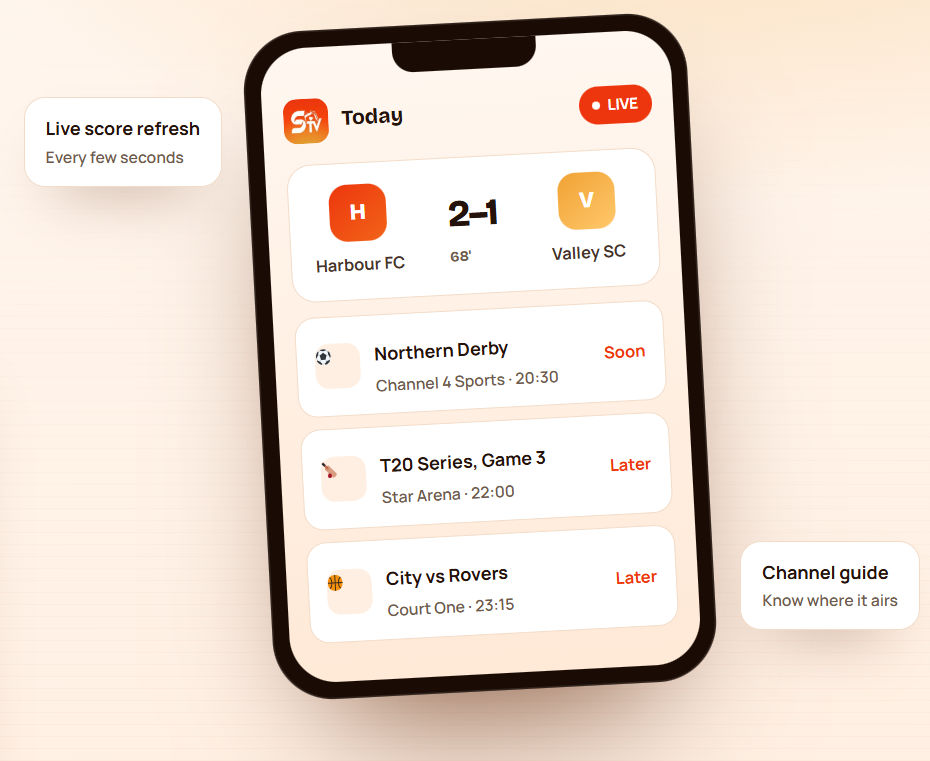
Suuma TV puts live scores, fixture times, channel listings and team news on a single Android screen, so you stop jumping between six tabs to find out who is playing and where it is showing.
- No sign-up to browse
- Works on phones and tablets
- Light on storage
18 MB
Small download size
6.0+
Android version supported
6
Sections in the app
Free
No purchase to browse
What is Suuma TV?
Suuma TV is a free Android app that collects sports and television information in one place. Instead of opening a scores site, a fixtures page and a channel listing separately, you open one app and see what is playing right now, what starts next, and which channel is carrying it.
The app is built around reading, not streaming heavy video files, so it stays small and loads quickly even on an older handset or a slow connection.
- A single home screen for live matches, fixtures and channel times.
- Scores that update while a match is in play, without a manual refresh.
- Team and competition pages for the sports you follow most.
- Built for Android phones and tablets, with a layout that scales to both.
App at a glance
App name
Suuma TV
Category
Sports & entertainment
Platform
Android
File type
APK
Latest version
2.4.1
Download size
18 MB
Minimum Android
6.0 and above
Developer
Suuma TV Team
Price
Free to download
Languages
English, Urdu, Arabic
What you can do inside the app
Six areas cover almost everything people open a sports app for. Nothing is buried more than
two taps deep.
Live score updates
Follow the scoreline, match clock and key moments while the game is still running, without reloading the page.
Fixture calendar
See today's games and the days ahead, with kick-off times shown in your device's local time zone.
Channel guide
Check which channel is carrying a match so you know where to watch before the whistle goes.
Team and league pages
Open a team to find its recent results, upcoming fixtures and position in the competition table.
Match reminders
Flag a game you care about and get a nudge before it starts instead of finding out at half time.
Light and quick
A small install footprint and simple screens, so the app opens fast on entry-level phones too.
A look at the main screens
Three screens do most of the work: what is on now, what is coming, and the detail behind a
single match.
Rivers
1–1
34'
Kestrels
Union vs Port
Second half
Coastal T20
14.2 overs
Live now
Everything in play, at the top.
Northern Derby
Today · 20:30
City vs Rovers
Today · 23:15
Cup Semi-final
Tomorrow · 18:00
League Round 12
Sunday · 16:45
Schedule
Kick-off times in your time zone.
Harbour
2–1
Full time
Valley
Goal · 68'
Harbour FC
Line-ups
Both squads listed
Table impact
Moves to 3rd
Match detail
Events, squads and what it changed.
Download Suuma TV for Android
Pick the build that matches your device. If you are unsure, take the latest one — older versions
are kept only for phones that cannot run the current release.
Latest version
v2.4.1 · 18 MB · Updated September 2026
- Current features and fixes
- Best compatibility with new Android builds
- Android 6.0 and above
Previous version
v2.3.6 · 17 MB · Archived
- For devices the latest build will not install on
- Missing the newest changes
- Keep only if you have a reason to
Official store listing
Automatic updates · Store verified
- Safest route when a listing exists
- Updates arrive on their own
- No sideloading permission needed
How to install the APK
Five steps, about two minutes. The only fiddly part is the permission Android asks for the first
time you install a file from a browser.
Download the file
Tap the download button above on the Android device you want to use. Let the browser finish saving the APK to your Downloads folder.
Allow installs from your browser
Open Settings, then Apps, then Special app access, then Install unknown apps. Choose the browser you downloaded with and turn the permission on. On older Android versions the setting is called Unknown sources and sits under Security.
Open the downloaded APK
Go to Downloads or your notification shade and tap the file. Android shows the app name and the permissions it asks for — read that screen before continuing..
Confirm the install
Tap Install and wait for it to finish. If Play Protect warns you, stop and re-check where the file came from rather than dismissing it out of habit.
Open the app and set it up
Launch Suuma TV, pick the sports or teams you follow, and turn the permission from step two back off if you do not plan to sideload anything else.
How Suuma TV works
The app is a reader, not a broadcaster. It pulls published match and schedule information,
arranges it, and keeps it current while you have the screen open.
You pick what to follow
Choose sports, competitions or teams once. That selection decides what lands on your home screen.
Data is fetched
The app requests current fixtures, scores and channel times over your internet connection.
It is sorted for you
Live games move to the top, upcoming ones sit below in time order, finished games drop into results.
It keeps refreshing
While a match is in play the score view updates on its own, so you can leave it open on the side.
Suuma TV compared with the usual alternatives
Most people track matches through a browser, a general news app, or a broadcaster’s own app.
Here is where a dedicated listing app is different.
| What you get | Suuma TV | Browser and search | General news app | Broadcaster app |
|---|---|---|---|---|
| Live score on one screen | Yes | Needs a reload | Usually | Only its own games |
| Channel and air time | Yes | Scattered | Rarely | Own channels only |
| Fixtures for several sports | Yes | Site by site | Limited | No |
| Works without an account | Yes | Yes | Often not | Login required |
| Install size | Small | None | Large | Large |
| Ads and pop-ups while browsing | Minimal | Common | Common | Varies |
| Subscription needed | No | No | Sometimes | Usually |
Android build details
Package type
APK
Architecture
arm64-v8a, armeabi-v7a
Screen support
Phone and tablet
Orientation
Portrait and landscape
Offline use
Cached data only
Background data
Used for score refresh
Install source
Sideload or store listing
Updates
Manual for sideloaded builds
Suuma TV for Android
The Android build is the only official build. There is no desktop client and no iOS package — an APK is an Android file format and will not open on an iPhone or iPad.
It is put together for the phones people actually carry, not just
flagships: modest memory use, a layout that works on a small screen,
and screens that stay readable when you rotate a tablet into landscape.
- Runs on Android 6.0 and later, including current releases.
- Works on both 32-bit and 64-bit devices.
- Sideloaded copies need updating by hand when a new version appears.
- Android TV and emulators are not officially supported builds.
Suuma TV compared with the usual alternatives
Most people track matches through a browser, a general news app, or a broadcaster’s own app.
Here is where a dedicated listing app is different.
| What you get | Suuma TV | Browser and search | General news app | Broadcaster app |
|---|---|---|---|---|
| Live score on one screen | Yes | Needs a reload | Usually | Only its own games |
| Channel and air time | Yes | Scattered | Rarely | Own channels only |
| Fixtures for several sports | Yes | Site by site | Limited | No |
| Works without an account | Yes | Yes | Often not | Login required |
| Install size | Small | None | Large | Large |
| Ads and pop-ups while browsing | Minimal | Common | Common | Varies |
| Subscription needed | No | No | Sometimes | Usually |
Permissions and safety
Sideloading skips the checks a store would normally run for you, so it is worth knowing what the app asks for and why. If a permission on the install screen does not match the list here, treat that file as suspect and delete it.
A sports listing app has no business reading your contacts, your messages or your call log. Anything asking for those is not the app described on this page.
Internet access
Needed to fetch scores, fixtures and channel times. Without it the app shows only cached data.
Notifications
Only if you set a match reminder. You can decline it and still use everything else.
Storage or cache
Used to keep recent listings on the device so the app opens faster next time.
Not requested
Contacts, SMS, call logs, microphone, camera and precise location are not needed by this kind of app.
What changed recently
Version notes matter more than usual with sideloaded apps, because nothing updates by itself. If you installed the APK months ago, this is what you have been missing.
Replace the entries below with the publisher’s real release notes. Invented changelogs are easy to spot and damage trust.
Version 2.4.1
September 2026- Faster load on the live screen
- Channel times now follow the device time zone
- Fixed a crash when opening a finished match
Version 2.3.6
Earlier release- Added team pages with recent form
- Reduced background data use
Earlier versions
Archive- Initial fixture calendar and reminders
- First public Android release
What users say
Collected from user feedback. Swap these for real, attributable reviews before the page goes live.



Guides and troubleshooting
The six problems people run into most, and what actually fixes them.
"App not installed" appears
Android blocks the install when an older copy is already on the device with a different signature, or the download finished incomplete.
Play Protect blocks the file
Android flags sideloaded apps it has not seen before. That is normal for any APK, but it is also the warning you would get for a real problem.
Scores are not updating
Usually a connection or battery setting rather than the app. Aggressive battery savers suspend background refresh on many Android skins.
Wrong kick-off times
Times are shown against the device clock. A phone set to the wrong zone or a manual time will shift every fixture on the schedule.
Reminders never arrive
Notification permission is asked for once. If it was declined, reminders are set but silently never shown.
Keeping the app up to date
A sideloaded APK does not update itself. You stay on the version you installed until you replace it by hand.
Frequently asked questions
What is Suuma TV used for?
It is an Android app for following sport: live scores, fixture times, channel listings and team information gathered onto one screen instead of spread across several sites.
Is Suuma TV free?
The app is free to download and browse. Confirm current pricing and any in-app purchases on the publisher’s official listing before you install.
Is it safe to install an APK?
It is safe when the file comes from the publisher or an established store and you check it before opening. Sideloading is riskier than a store install because nobody has vetted the file for you, so verify the source, compare the file size, and keep Play Protect switched on.
Why is Suuma TV not showing the latest scores?
First check that your internet connection is working properly. If the connection is stable, close and reopen the app. Battery-saving or background-data restrictions on some Android phones can also prevent live information from refreshing correctly.
Can I use Suuma TV on an Android tablet?
Yes. Suuma TV can be used on supported Android tablets as well as Android phones. The interface is designed to adapt to different screen sizes for easier viewing.
Where can I find upcoming match schedules?
Open the fixture or schedule section inside Suuma TV to check upcoming matches. Match times are generally displayed according to your device settings, so keeping your date and time zone correct helps avoid schedule differences.
Why does Android ask for permission before installing?
Installing from a browser needs the “Install unknown apps” permission for that browser. It is a one-time approval, and you can switch it back off once the install finishes.
Does Suuma TV work on iPhone or a laptop?
No. An APK is an Android package. There is no iOS or desktop build, and emulators are not an officially supported way to run it.
How much data does it use?
Listings and score updates are small text requests, so day-to-day use is light. Leaving a live match screen open for long stretches uses more, since it refreshes while it is in view.
What should I do if Suuma TV stops working after an update?
Restart the app and your device first. If the problem continues, make sure you are using a compatible version of the app and that enough storage space is available. Reinstalling the latest trusted version may also resolve corrupted installation files.
Does Suuma TV work without an internet connection?
An internet connection is required to retrieve current scores, fixtures, schedules and other updated information. Previously loaded or cached information may remain visible temporarily, but it should not be treated as current data while offline.
How can I receive match reminders on Suuma TV?
If the app provides match reminders, select the match you want to follow and enable its reminder option. You should also allow notification permission in Android settings so alerts can appear before or during the selected match.
Will it update itself?
Only if you installed it from a store listing. A sideloaded APK stays on the version you installed until you download and install a newer one yourself.
Can I watch matches inside the app?
This page describes an information app: it tells you the score and where a match is being shown. Actually watching depends on the broadcaster or service that holds the rights where you live.
Is this the official Suuma TV website?
This is an independent information page about Suuma TV and is not operated by, affiliated with, or endorsed by the app or its developer. Replace this line with your accurate ownership or affiliation wording before publishing, and never imply official status unless you own or represent the app.
Does Suuma TV require an account to use?
No. You can browse the main sports information, fixtures, scores and channel listings without creating an account. This makes it quick to open the app and check upcoming or live matches.
Which Android versions support Suuma TV?
Suuma TV is designed for Android 6.0 and later versions. For the best compatibility and security, it is recommended to keep your Android device and the app updated.
What sports information can I find on Suuma TV?
Suuma TV brings together live scores, upcoming fixtures, match schedules, channel information and team-related details. Available information can vary depending on the sport, competition and current schedule.