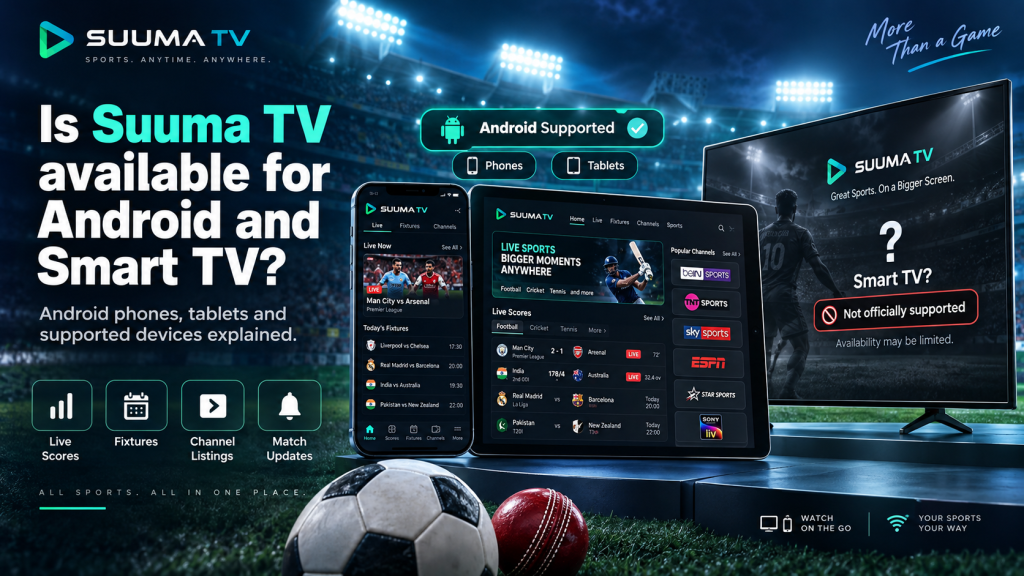
Suuma TV is primarily designed for Android users who want convenient access to live scores, fixtures, channel listings, team information, and match updates. The app works best on compatible Android phones and tablets, allowing sports fans to follow important information whether they are at home, traveling, or simply checking a match on the go.
Smart TV compatibility is slightly different because not every television that uses Android technology can run mobile Android apps properly. Suuma TV does not currently list Android TV or Google TV as officially supported platforms, so users should understand the difference between mobile Android devices and television-based operating systems before attempting installation.
Android Is the Main Supported Platform
Suuma TV is primarily built for Android devices, with Android phones and tablets offering the most reliable experience. The app supports Android 6.0 or later, which means many older as well as newer smartphones can meet the basic software requirement without needing expensive flagship hardware.
The application also supports both 32-bit and 64-bit ARM devices, making it compatible with a broad range of Android phones and tablets. As long as the device meets the minimum Android version, has enough free storage, and maintains a stable internet connection, users should be able to access the app’s main sports-information features.
Android Phones Provide the Smoothest Experience
Android smartphones are the most practical devices for using Suuma TV because the app is designed around a mobile interface. Users can quickly check live scores, upcoming fixtures, match schedules, team information, and channel listings without moving through complicated menus or large desktop-style layouts.
The app’s relatively lightweight nature can also make it suitable for entry-level and mid-range Android phones. Users do not necessarily need the latest processor or a premium device, although newer hardware may provide faster loading, smoother navigation, and better overall performance.
Android Tablets Are Also Compatible
Suuma TV can also work on compatible Android tablets, giving users more screen space when viewing fixtures, league information, team pages, and match details. The larger display may be particularly useful for people who prefer reading sports information on a tablet rather than repeatedly zooming or scrolling on a smaller phone screen.
The app supports both portrait and landscape orientations, which makes tablet use more flexible. A Wi-Fi-only tablet can also use Suuma TV because the app depends on internet access rather than a SIM card, so users only need a stable Wi-Fi connection to retrieve current sports information.
Chromebook Support Depends on Android App Compatibility
Some Chromebooks can run Android applications through Google Play, which means Suuma TV may work on supported Chromebook models. In this situation, the device is essentially running the Android version of the app rather than a dedicated ChromeOS desktop edition.
Compatibility therefore depends on the particular Chromebook and whether Android apps are supported through Google Play. Users should check the Suuma TV store listing directly from their Chromebook, because the Play Store can normally determine whether the available build is compatible with that specific device.
Android TV Is Not Officially Supported
Android TV and Google TV use technology related to Android, but they are designed differently from Android phones and tablets. Television apps normally require layouts that work with remote controls, larger screens, focus-based navigation, and interfaces that do not depend on touchscreen gestures.
Suuma TV does not currently list Android TV as an officially supported platform. This means users should not assume that the mobile application will automatically provide the same experience on an Android-powered television simply because both devices use versions of Android.
Why Mobile Apps Can Behave Differently on a TV
A mobile application may install on certain Android-based televisions but still be difficult to use properly. Navigation buttons may not respond well to a remote, some menus may be designed for touch controls, and the interface may not scale correctly for a large television display.
Notifications, orientation settings, and other mobile features can also behave differently on a television. For this reason, an officially supported Android phone or tablet remains a more dependable option than forcing the mobile version onto a TV.
Can Suuma TV Be Sideloaded on a Smart TV?
Some Android-based Smart TVs allow users to install APK files manually, a process commonly known as sideloading. Technically, this may allow someone to attempt to install the Suuma TV mobile APK even when the app is not available in the television’s normal app store.
However, successful installation does not guarantee proper compatibility. Because Suuma TV is not officially optimized for Android TV, users may experience navigation problems, screen-layout issues, missing functionality, or difficulty controlling the app with a standard TV remote.
For reliability and security, using the app on an officially supported Android phone or tablet is a better option. Sideloading should not be treated as equivalent to official Smart TV support.
Samsung and LG Smart TVs Use Different Systems
Many popular Smart TVs do not run Android at all. Samsung televisions generally use the Tizen operating system, while LG Smart TVs commonly use webOS, and these platforms use different application formats from standard Android APK files.
Because of these differences, an Android APK cannot normally be installed directly on a Samsung or LG Smart TV. Suuma TV does not currently provide dedicated Tizen or webOS versions, so users of these televisions should not expect the Android mobile app to install in the same way it would on a phone or tablet.
This is why the general term “Smart TV” can sometimes be misleading when discussing app compatibility. Every Smart TV platform has its own operating system, supported app store, and technical requirements.
Suuma TV Is Not a Full Television Streaming App
Another important point is that Suuma TV is primarily a sports-information application rather than a conventional live television streaming platform. Its main features revolve around live scores, fixtures, schedules, team information, match reminders, and channel listings.
The channel guide can help users identify which broadcaster is carrying a particular sporting event, but that does not automatically mean the full television channel is streamed directly inside Suuma TV. Access to the actual broadcaster may still depend on a separate television provider, streaming service, or regional subscription.
This distinction is especially important for Smart TV users who may expect the app to behave like a traditional television-streaming service. Suuma TV is better understood as a sports companion and viewing guide.
Which Device Should You Use for Suuma TV?
For the most reliable experience, an Android smartphone or tablet running Android 6.0 or later remains the best choice. These devices are closest to the platform for which Suuma TV is designed and provide straightforward access to scores, fixtures, channel information, team details, and match reminders.
A supported Chromebook can also be an option if it is capable of running Android applications through Google Play. Smart TVs, however, should not be considered officially compatible unless Suuma TV introduces a dedicated Android TV, Google TV, Tizen, or webOS version in the future.
Users who want to view information on a larger screen may find an Android tablet more practical than trying to install the mobile APK on an unsupported television. This provides more display space while still staying within the app’s intended Android environment.
Conclusion
Suuma TV is officially best suited to Android phones and tablets running Android 6.0 or later, with some compatible Chromebooks also able to use the Android version through Google Play. These devices provide the most dependable way to access live scores, fixtures, channel listings, team information, and match-related updates without relying on unsupported installation methods.
Suuma TV is not currently listed as an officially supported Android TV, Google TV, Samsung Smart TV, or LG Smart TV application. Although sideloading may technically work on certain Android-based televisions, proper navigation, stability, and functionality are not guaranteed, so users should rely on supported Android mobile devices until dedicated Smart TV support becomes officially available.